
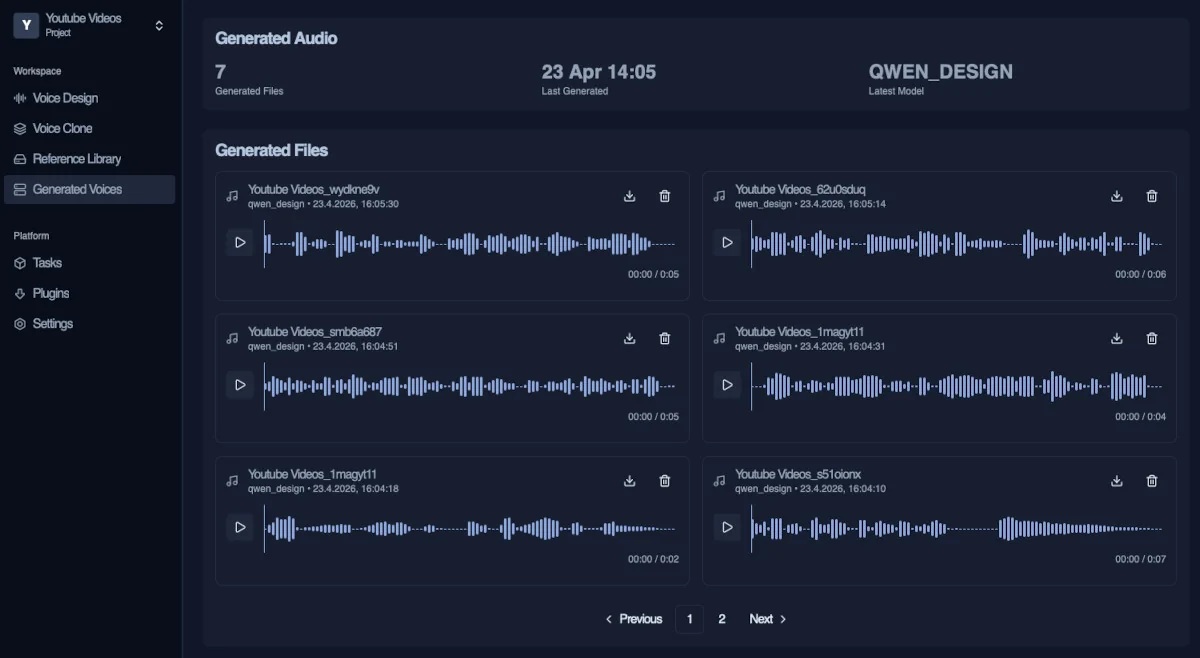
Vocal Engine Desktop TTS

Voice Design & Cloning Built for local, Studio Quality Speech

Create realistic voices, clone timbres and refine speech workflows locally on your desktop. Powered by Qwen3 TTS, OpenAI Whisper, DeepFilterNet and FFmpeg.
No cloud, no limits — just full control over your audio pipeline.

Voice Quality

Natural Speech that feels Real
with Emotion you can Hear

Generate natural speech with distinct tone, emotion and clarity. From young voices to mature timbres — Vocal Engine lets you design and clone voices that feel real.

Natural Female Voice

Smooth, expressive and lifelike. Capture subtle tone variations, emotional depth for narration and dialogue.

preview
Young Voice Profiles

Generate youthful voices with clean articulation and natural pacing — ideal for storytelling, apps or design.

preview
Modern Male Voice

Balanced and clear with a natural tone. Perfect for content creation, voiceovers and production flows.

preview
Mature Female Voice

Warm, calm and authentic. Recreate older voice characteristics with realistic texture and depth.

preview
Child Voice Generation

Soft, natural and age-accurate. Generate child-like voices without sounding artificial or exaggerated.

preview
Deep & Senior Voices

Rich, deeper tones with natural aging characteristics. Ideal for narration, storytelling and character voices.

preview
preview
Local AI Engine

No cloud. No limits.
Turn your idea to real voices

Generate, design and refine speech directly on your machine. No cloud delays, no usage limits — just fast, real-time performance with full control.

1. Create or Import Voice

Create voices from scratch using prompts with the Designer, or import reference audio for cloning. Build your voice exactly the way you need.

2. Generate Speech

Generate realistic speech using your designed voices or cloned references. Control tone, style and character with precision.

3. Refine & Process

Enhance audio with transcription, cleanup and mastering tools. Improve clarity, remove noise and optimize overall sound quality.

4. Export & Use

Export high-quality audio files for your projects and workflows. Use them in videos, apps, content or production environments.

Use Cases

Built for Creators, Storytellers and anyone Building with Voice

From content creation to game development — Vocal Engine helps you generate, clone and adapt voices for real-world production workflows quickly and efficiently.

Voice designed & generated with Vocal Engine
Content Creation & Youtube

Create voiceovers for videos in seconds. Generate consistent narration without recording, retakes or expensive voice actors.

Game & Character Voices

Design unique voices for characters or clone existing ones. Perfect for dialogue, prototyping and immersive storytelling.

Podcasts & Voice Production

Generate clean speech for podcasts, narration or audio projects. Maintain consistent tone across episodes and formats.

Voice Translation & Localization

Translate spoken content into other languages while preserving the original voice style and character.

Voice Cloning

Turn a single Recording
into a Natural, living Voice

Use reference audio to recreate voices with realistic tone and character. Generate new speech that stays consistent, natural and expressive across every output.

Voice Clone #1
YouTube source, generated voice
preview
12/sec. input
Generated from short YouTube audio using transcription, cleanup and voice cloning. Natural tone and consistent speech from minimal input.
  • YouTube reference audio
  • Whisper transcription
  • DeepFilter enhancement
  • Realistic voice output
Voice Clone #2
Same workflow, different voice
preview
15/sec input
Different source, same process. Voice tone and pacing are recreated accurately, producing clean and natural sounding speech.
Ideal
  • Minimal reference needed
  • Consistent voice tone
  • Clean speech generation
  • Fully local processing
Voice Clone #3
Processed and generated locally
preview
10/sec input
All processing runs locally using transcription and audio enhancement. Results stay consistent across different voices and inputs.
  • Offline voice processing
  • Noise reduction included
  • Stable generation pipeline
  • High quality output
Voice Designer

Design entirely new Voices
without any source Audio

Design voices from scratch using prompts and controls. No recordings required — everything runs locally on your machine.

Click on the wave to play the audio
FAQS

Frequently Asked Questions

Got questions? Below, you'll find a list of our most frequently asked questions to help you get started, understand features and make the most of it.

Voice generation in Vocal Engine is powered by an advanced voice design system that allows you to create entirely new voices from scratch. Instead of relying on existing recordings, you define characteristics like tone, emotion, clarity and style using prompts and adjustable parameters. The system interprets these inputs and generates a unique, natural-sounding voice in real time. This gives you full creative control without being limited by source material.

Yes, Vocal Engine supports high-quality voice cloning using short reference audio samples. You can import audio from various sources, such as generated audio from voice designer, recordings or extracted clips, and the system will automatically transcribe and process it locally. With built-in tools like Whisper transcription and audio enhancement, even lower-quality inputs can be improved and transformed into clean, usable voice outputs. This makes it easy to recreate voices while maintaining clarity and consistency.

Vocal Engine only requires an internet connection during the initial setup to download the AI environment and necessary models. Once everything is installed, the application runs fully locally on your machine without needing any active internet connection. This allows you to work completely offline while maintaining full control over your data and workflows. It also ensures consistent performance without relying on external services or network stability.

Yes, Vocal Engine is completely free to use. There are no subscriptions, no hidden usage fees and no limitations based on generation time or credits. Since everything runs locally on your hardware, you are not paying for cloud processing or API usage. This makes it an ideal solution for creators, developers and teams who want full access to powerful voice technology without ongoing costs.

Vocal Engine is built to produce highly natural and expressive voice output with realistic tone, pacing and emotion. The system combines voice modeling with optional audio enhancement tools to ensure clean and professional results. Whether you are generating voices from scratch or cloning from reference audio, the final output is optimized for clarity and usability in real-world applications like content creation, games or voiceovers. With the right setup, results can reach near human-level quality.

Languages

High Quality natural Speech
with ease in any Language

Generate speech in different languages with consistent tone, clarity and emotion. Perfect for global content, localization, dubbing and multilingual audiences.

Spanish Voice Output

Generate natural Spanish speech with clear pronunciation and flow. Ideal for videos, narration and global audience reach.

preview
German Voice Output

Create precise German voice output with strong clarity and tone. Perfect for tutorials, business content and professional use.

preview
French Voice Output

Produce smooth French speech with natural rhythm and expression. Great for storytelling, media content and creative projects.

preview

Create voices like never before,
fully local and completely Free

Whether you are creating content, building characters or localizing audio, Vocal Engine gives you full control over voice generation. Everything runs locally, giving you speed, privacy and complete creative freedom.

%